

Accessing an online casino should be simple, secure and transparent. For British players, the login process at Europa Casino usually takes only a few moments, whether the account is opened on a computer, smartphone or tablet. This guide explains how to reach the correct website, enter your credentials, solve common access problems and protect your account while playing.
Players searching for Europacasino UK English Games should also check that they are using the official casino website and that the available services are permitted in their location. Casino terms, payment options, identity checks and game availability can change, so always read the current information displayed on the operator’s pages.
Before You Try to Log In
Prepare the email address or username connected with your Europa Casino account and the password you selected during registration. You will also need a stable internet connection and an up-to-date browser. Chrome, Safari, Firefox and Edge are generally suitable, although the casino may recommend particular versions.
- Use the official Europa Casino web address.
- Check that the connection begins with https://.
- Keep your login details private.
- Disable any browser extension that interferes with page scripts if necessary.
- Make sure cookies and JavaScript are enabled for the casino website.
Do not follow login links sent by unknown people through email, social media or messaging services. Fraudulent pages can copy the appearance of a casino and collect passwords. Enter the address manually or use a trusted bookmark.
Step-by-Step Login Instructions
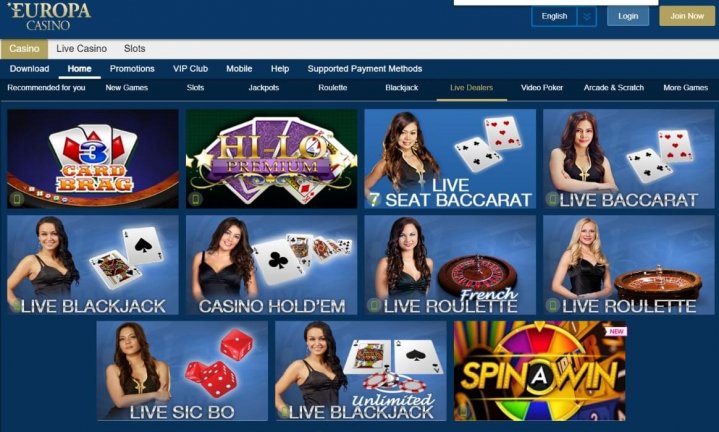
Open the Official Website
Launch your browser and visit the official Europa Casino website. The homepage should display recognizable navigation, responsible-gambling information, account options and contact details. If a page looks unusual, contains excessive pop-ups or asks for unrelated personal information, close it and verify the address.
Select “Log In”
Look for the Log In, Sign In or similar button, usually positioned in the upper-right corner of the homepage. Select it to open the account form. Registration and login are different options: choose registration only if you do not already have an account.
Enter Your Details
Type the email address, username and password associated with your account. Password fields are case-sensitive, so check capital letters, numbers and symbols carefully. If you are using a shared device, avoid selecting an option that saves your credentials.
Complete Additional Verification
Europa Casino may ask for a verification code, captcha or another security step. Follow the instructions shown on screen. If a code is delivered by email or text message, enter the newest code rather than an earlier one, because temporary codes can expire.
Confirm Access
After successful authentication, you should see your account area, balance, promotions or cashier section. Before starting a game, review the account status and confirm that the displayed currency and personal information are correct.
What to Do If the Login Does Not Work
Most failed login attempts are caused by a typing error, an old password or a browser problem. First, re-enter your details slowly. Check whether Caps Lock is enabled and remove any accidental spaces copied before or after your email address.
Password Recovery
Select Forgot Password or the equivalent link on the login screen. Enter the email address registered with the account and follow the recovery instructions. Check the spam, junk and promotional folders if the message does not appear in your inbox.
Use a new password that is unique to Europa Casino. A strong password should contain a mixture of upper- and lower-case letters, numbers and symbols. Avoid names, birthdays, football teams and other information that can be guessed easily.
Browser and Device Troubleshooting
- Refresh the login page.
- Clear cached files and cookies for the casino website.
- Try a private browsing window.
- Switch to another supported browser.
- Update the browser or operating system.
- Test a reliable internet connection.
If the website is temporarily unavailable, wait and try again later. Do not repeatedly submit incorrect passwords, as several failed attempts may trigger a temporary security lock.
Questions and Answers
Can I log in from a mobile phone?
In most cases, yes. Open the official website in a mobile browser and use the same credentials as on desktop. If Europa Casino provides a dedicated mobile application in your jurisdiction, download it only from an official source. Never install an app file offered by an unknown website.
Why is my account asking for identity verification?
Online casinos may request documents to comply with anti-money-laundering rules, age requirements and account-security procedures. The request may occur during registration, before a withdrawal or after unusual account activity. Submit documents only through the secure account area or verified support channel.
Can I use a VPN to access the casino?
Using a VPN may conflict with the operator’s terms and can cause location or security checks to fail. It may also create problems with bonuses, payments or withdrawals. Use the casino only where its services are legally available and follow its current geographic rules.
What if I no longer have access to my email?
Contact official customer support and explain the situation. Be ready to answer account-security questions. Do not create a second account simply to bypass the problem, because duplicate accounts can violate casino terms.
Can I stay logged in permanently?
It is safer to log out after each session, especially when using a public or shared device. A saved login can allow another person to access the account, view personal details or use available funds.
Security Advice for UK Players
Account security is part of responsible online gambling. Choose a private password, activate two-factor authentication if it is offered and keep your email account protected. Do not share one-time codes, passwords or payment details with anyone claiming to represent the casino through an unofficial channel.
After logging in, review recent activity and check for unfamiliar deposits, withdrawals or account changes. If something appears suspicious, change the password immediately and contact support through the official website. Consider contacting your payment provider if an unauthorized transaction is visible.
| Situation | Recommended action | What to avoid |
|---|---|---|
| Forgotten password | Use the official password-recovery link | Sending your password to another person |
| Missing verification email | Check spam folders and request a new message | Opening links from suspicious senders |
| Account temporarily locked | Wait or contact verified support | Creating another account to bypass the lock |
| Unrecognized activity | Change your password and report it promptly | Continuing to deposit before investigating |
Login, Payments and Withdrawals
Logging in gives access to the cashier, but it does not guarantee that every payment method will be available. Options can depend on verification status, location, currency and the operator’s current policies. UK players should review processing times, minimum and maximum amounts, fees and any wagering conditions before making a transaction.
Never use another person’s bank card or e-wallet. The payment account should normally match the registered casino account holder. A mismatch may delay verification or result in a rejected withdrawal.
Responsible Access to Casino Games
A successful login is only the beginning of the session. Set a budget and time limit before playing, and treat gambling as entertainment rather than a way to earn money. Do not chase losses or increase stakes to recover previous results. If gambling stops feeling enjoyable or becomes difficult to control, use the casino’s limits, time-outs or self-exclusion tools.
Players in Great Britain can also seek independent help from organizations such as GamCare, while residents elsewhere in the UK should consult an appropriate local support service. Responsible-gambling tools can often be found in the account menu or cashier area after login.
Final Checklist
- Visit the verified Europa Casino website.
- Confirm the secure connection before entering details.
- Use the correct email or username and password.
- Complete any captcha or verification-code request.
- Recover forgotten credentials through the official form.
- Contact verified support if access remains unavailable.
- Log out on shared devices.
- Check current terms, eligibility and responsible-gambling tools.
For most UK players, logging in to Europa Casino is a quick process: open the official site, select the login button, enter the registered details and complete any required security check. Careful verification of the website and sensible account-security habits help keep access reliable while protecting personal information and funds.